GPT Image 2 for the card where every letter counts
GPT Image 2 is an OpenAI image model, tagged Sharp details in our picker, where it sits next to its sibling GPT Image 2.5 Flare. Flare is our Auto and keeps faces best. GPT Image 2 is the one we open when the card carries words, a name or a number, or when it will be printed and looked at closely.
- Made by OpenAI
- from 100 credits
Updated 29.09.2026
Two GPT Image 2 pictures at 2K, one with lettering
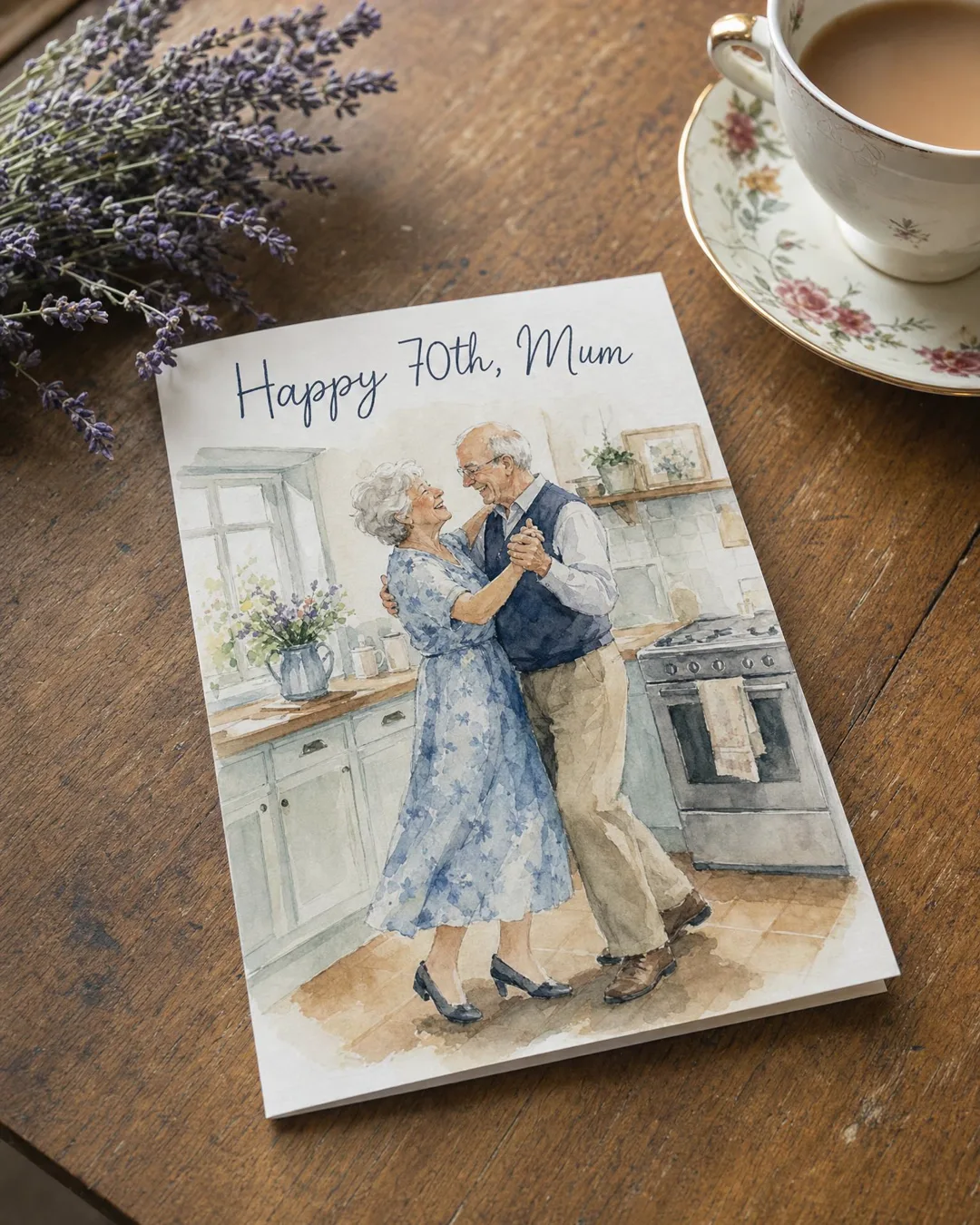
Prompt
A printed birthday greeting card lying on a wooden table next to a cup of tea and a sprig of lavender. The card shows a watercolour illustration of an old couple dancing in a kitchen, and neat hand-lettered text at the top that reads exactly: "Happy 70th, Mum". Soft morning light, shallow depth of field, realistic photo.
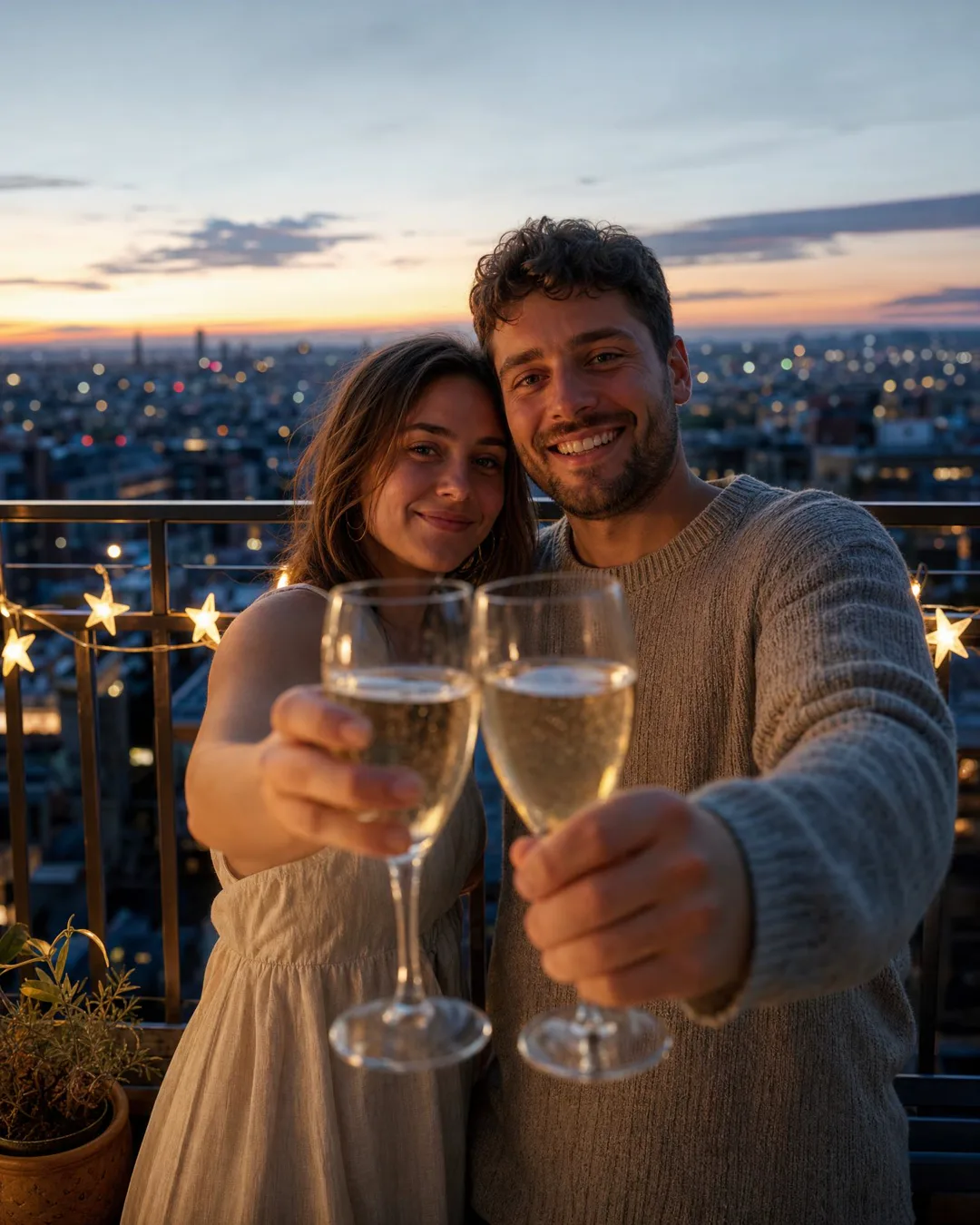
Prompt
Candid photo of a young couple on a balcony at dusk raising glasses of sparkling wine towards the camera, city lights behind them, a small banner of paper stars on the railing, natural skin, detailed fabric of her linen dress and his knitted sweater, warm and cinematic, no text
Three GPT Image 2 prompts: two lettered, one without words
A folded card standing on a windowsill beside a jar of wild flowers, a pencil drawing of a lighthouse on the front and brush lettering underneath that reads exactly: "Happy birthday, Dad". Soft morning light, realistic photo, no other text
A first birthday cake on a high chair tray, white icing that reads exactly "Lior 1", one fat candle, a small hand reaching in from the edge of the frame, balloons blurred behind, soft daylight, realistic photo, no other text
Close-up of two old hands holding each other on a crocheted blanket, gold wedding rings, a glass of mint tea on the side table, afternoon light from a window on the left, natural skin texture, no text
What GPT Image 2 does better than Flare
Lettering you can read
The card above asked for hand lettering that reads exactly "Happy 70th, Mum" and came back at 2K in a flowing script with every letter in place. Names, ages and dates are where a card goes wrong in front of the whole family, and this is the model we hand them to.
Texture that holds up close
In the balcony picture you can see the knit of his sweater, the weave of her linen dress, bubbles in the glasses and the star-shaped lights along the railing. That is what its Sharp details tag means, and it matters on paper and on a big screen.
A card that looks printed
Ask for the card as an object in a room, the way the 70th card above lies on an old table by a teacup, and you get something that looks bought and photographed. It is a good format for a greeting that has nobody's face in it.
Worth the extra minute
A GPT Image 2 card takes about 80 seconds here against about 25 for Flare, and it costs more. For a quick card of your people, that is the wrong trade. For a name that must be right on a card that will be printed, it is the right one.
Text on image with GPT Image 2: a recipe and its limits
The recipe is short. Put the exact words in quotation marks after "reads exactly". Say where they go and what they are made of: brush lettering, gold foil, icing, chalk, an old typewriter. Close with "no other text", or the picture may grow a second line nobody asked for. Keep it to a name, an age, a date or three or four words. The long message belongs in the greeting itself, and text greetings here are free.
The limits are real. Our lettered example is in English, in Latin letters, and that is where we have checked GPT Image 2 most. Hebrew and Arabic run right to left, Arabic letters join up, and Cyrillic has its own shapes; we have not put those scripts through the same checks. For them, keep the lettering to one or two words and read every letter. If it comes out wrong twice, write the words in the message and keep the picture clean.
Each new attempt costs the same as the first, so fix the prompt before pressing again.
GPT Image 2 or GPT Image 2.5 Flare
They come from the same maker, draw at the same 1K or 2K and take the same 8 reference photos. Where they part ways is what each one gets right. Flare's strength is likeness: when we compared the models on real family photos it held faces best, so Auto runs on it, and a card takes about 25 seconds. GPT Image 2's strength is the surface around the faces: letters, fabric, wood, paper.
So let the card decide. If it shows your people and nobody will look past the faces, use Flare. If it has words on it, or no faces at all, use GPT Image 2.
That second case is easy to overlook. A card made of hands, objects and lettering needs no likeness: a cake with "Noa, 6" in icing, two old hands with wedding rings, a folded card on a windowsill. Nothing in it can look like the wrong person, and GPT Image 2 is at its best there.
Detail comes from naming materials
The balcony picture shows how detail is asked for. Its prompt named the fabrics, her linen dress and his knitted sweater, and asked for natural skin. The picture came back with the knit, the linen, bubbles rising in the sparkling wine and a row of star-shaped lights along the railing. None of it took more than a few words.
Wool, oak, brown paper, candle wax, lace: say what things are made of and the model has something to be sharp about. Say where the light comes from too, because texture shows up in side light. Pick 2K for print. After that, upscale makes a finished picture sharper still, and reframe changes its shape for a phone or a wide screen.
The couple on the balcony is invented, made from words alone. When a picture like that should show your own people, make it with Flare and keep GPT Image 2 for the lettered card.
Getting the words onto the card
- 1
Choose Photo card, then GPT Image 2
The button here opens the composer in Standard mode on Photo card with GPT Image 2 already chosen. From elsewhere in the app, switch to Standard, pick Photo card and change Model from Auto, which would use GPT Image 2.5 Flare.
- 2
Quote the words, place them, style them
Write "reads exactly:" followed by the words in quotation marks. Say where they sit and how they look: brush lettering across the top, white icing on the cake, chalk on a board by the door. End the prompt with "no other text".
- 3
Make it at 2K and read every letter
Pick 2K, check the price on the button and press it; a failed picture returns its credits. After about 80 seconds, read the lettering letter by letter before you send it, print it or schedule it for the day.
GPT Image 2, with today's price
One row, live price. When faces come first, GPT Image 2.5 Flare starts cheaper and finishes in about a third of the time; when five people must fit, Nano Banana Pro.
| Model | Strong at | Length | Quality | Price |
|---|---|---|---|---|
| GPT Image 2OpenAI | Sharp details | up to 8 photos of your people | 1K, 2K | from 100 credits |
Prices are in credits and are always shown on the button before you press it. Pricing
Keep exploring
GPT Image is OpenAI's family of image models, from the makers of ChatGPT, and two of them work here. GPT…
OpenNano Banana ProNano Banana Pro is the Pro of Google's two Nano Banana models in our picker. It keeps up to five…
OpenAI photo cardAn AI photo card puts your own people into one picture: add a photo of each and they sit at…
OpenQuestions and answers
It can try, but check every letter. The lettering we have tested most is English; Hebrew and Arabic run right to left and Arabic letters join, so short words are the safe bet there, and Russian needs the same care. If it goes wrong twice, write the words in the greeting message, which is free, and keep the picture without text.
Quote it exactly and keep it short. Write "lettering that reads exactly:" followed by the name in quotation marks, say where it sits and in what style, and end the prompt with "no other text". A name and an age are far safer than a sentence. Read the result letter by letter before you send it.
Because they are good at different things. Flare, our Auto, gives the likeness closest to your photos and takes about 25 seconds. GPT Image 2 takes about 80 and costs more, but draws lettering and fine texture better; its tag in our picker is Sharp details. Pick by what the card is about: likeness goes to Flare, letters and texture to GPT Image 2.
It works with your photos, up to 8 of them, but it is not our first choice for likeness. GPT Image 2.5 Flare kept faces best when we compared the models on real family photos, and Nano Banana Pro holds up to five people. Use GPT Image 2 with your people when the lettering matters more than a perfect likeness.
About 80 seconds here, timed on our own cards, roughly three times as long as GPT Image 2.5 Flare. The wait buys sharper texture and cleaner lettering. If you are making three versions to choose from late at night, Flare gets you there faster.
Yes. Make it at 2K, the larger of the two sizes, and it holds up as a printed card or a framed picture. If you need it bigger, upscale makes the finished card sharper, and reframe changes its shape, say from tall to wide, without making the card again.
Get the name right on the card
Quote the name, place the words, and GPT Image 2 draws the card you send, print or frame on the day.
Write it with GPT Image 2


